
How to write dish names and descriptions that sell
Practical tips for restaurants and cafés: how long a dish name should be, what to put in the description and ingredients, how to show weight and portion, and which words make guests hungry. With before → after examples and screenshots of the WebQRMenu editor...
In a QR menu there's no waiter to tell the guest about a dish. Everything the guest learns, they read on their phone screen: the name, a couple of lines of description, the weight and the price. If the text is dull or unclear, the guest scrolls past and orders something they already know.
The good news: you don't need a copywriter for a menu that sells. You need a few simple rules. In this article we go through each field of the WebQRMenu dish editor and show how the text looks on the guest's phone.
In short: name — 2–4 words, the key word first; description — 1–2 sentences about why the dish is good, not a repeat of the name; ingredients — facts separated by commas; weight and portion — always; one or two sensory words instead of "tasty and flavorful".
Dish photos have their own article: Dish photos in WebQRMenu. Price variants, allergens, badges and all the specification fields are covered in detail in The dish card in WebQRMenu. Here we focus on the words.
1. Where guests read your texts
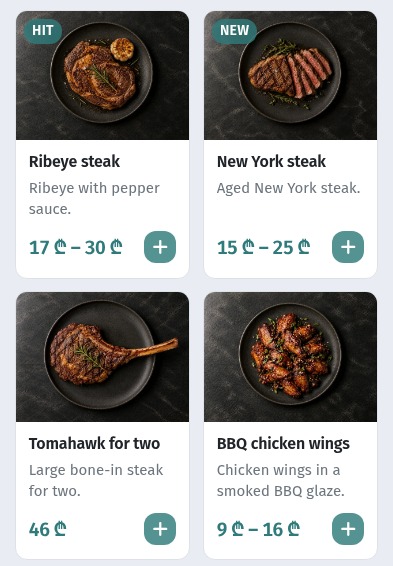
First the guest sees the dish tiles. A tile shows three things: the name, a short description and the price. The description gets two lines; anything longer is cut off with an ellipsis.
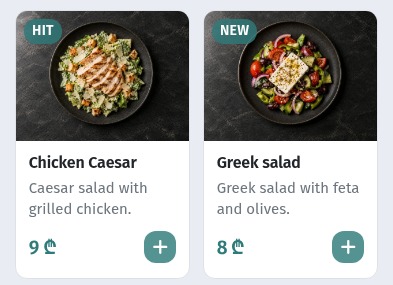
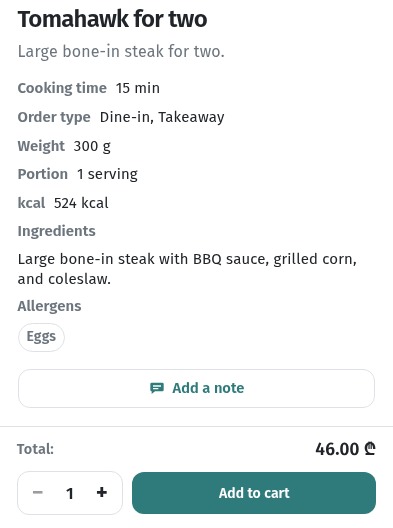
If a dish catches their eye, the guest opens its card. That's where everything is: the description, cooking time, order type, weight, portion, calories, ingredients and allergens.
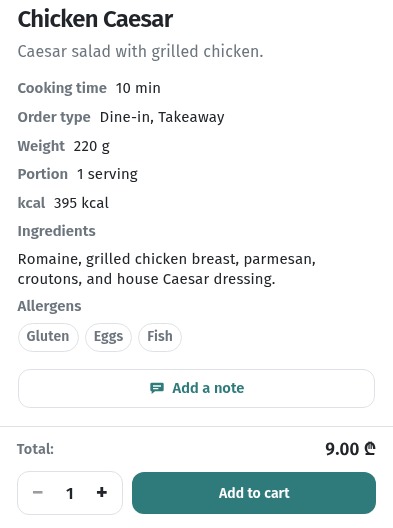
Hence the main rule: the tile has to sell the tap, the card has to sell the order. The name and the first words of the description do their job on the tile; the rest goes into the card.
2. The name: short and to the point
Everything is written in the dish editor (Menu content → the menu item). First you write the dish in the menu's base language: the name and ingredients in Basic information, the text in Description. Then, in the same editor, you open Translations and fill in a row for each language. Our demo menu's base language is Russian, so the screenshots in this article show the English row, where the English texts live.
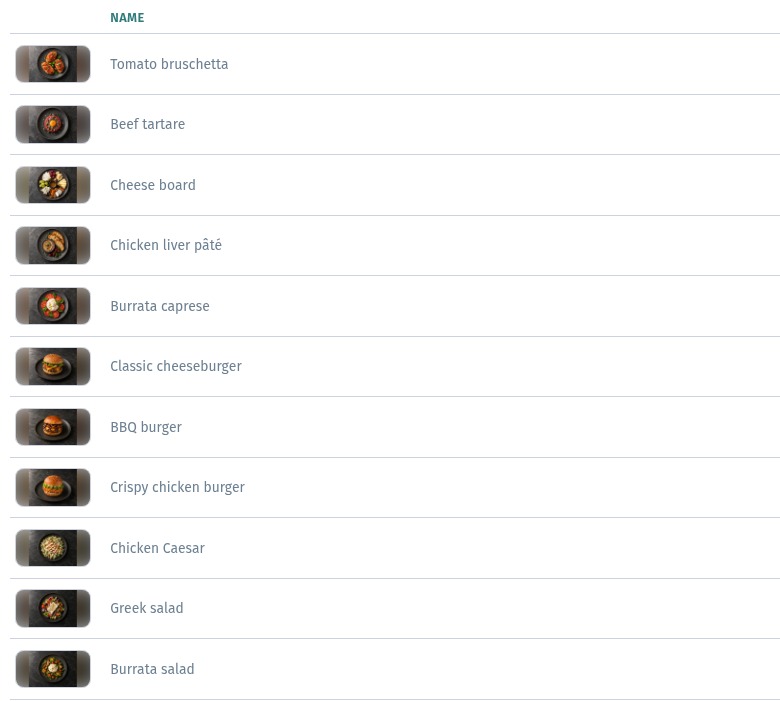
The Dish name field takes up to 120 characters, but that's headroom, not a target. The counter under the field shows how much you've used: "Chicken Caesar" is 14 / 120.
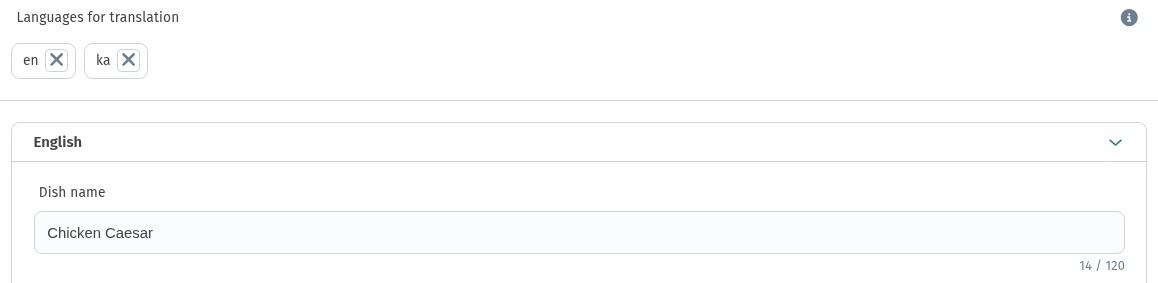
On a phone tile one line fits about 17–18 characters in English: "Chicken Caesar" and "BBQ chicken wings" stay on one line. Two lines are fine; three are hard to read. Translations are often longer: in the Georgian version of the same menu, "Greek salad" already wraps to a second line.
How to write a good name:
- Key word first. "Ribeye steak", "Burrata salad": guests scan the menu and latch onto the first word.
- 2–4 words. The dish plus one distinguishing detail: the cooking method, a key ingredient or the format ("for two").
- Clear without explanation. If a dish has a signature name ("Grandma's Secret"), say what it is: "Grandma's Secret cherry pie".
- One language per name. A name that mixes two languages reads worse than a clean "Crispy chicken burger".
- No ALL CAPS, codes or emoji. "HIT" and "NEW" are badges; you don't need to write them into the name.
Short, consistent names help you too: in the dashboard's item list, dishes are easy to find and hard to mix up.
3. The description: why order this
The Description field is a short text about the dish, up to 300 characters. Each translation row has its own Description with the same limit. It has basic formatting, but for a menu plain text in 1–2 sentences works best.
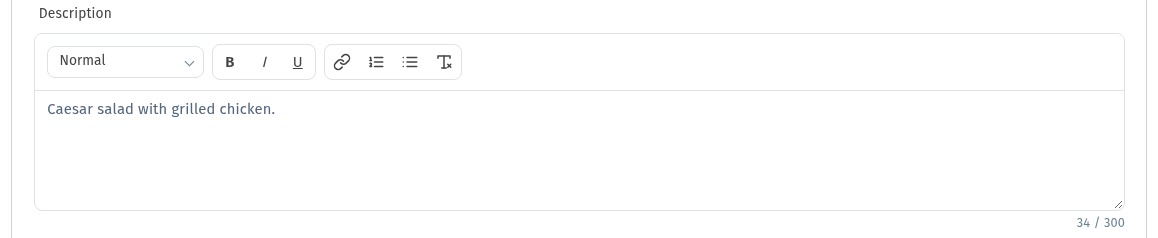
The most common mistake is a description that repeats the name. "Chicken Caesar" → "Caesar salad with grilled chicken" tells the guest nothing new. That's exactly the description on our demo card above; the before → after table below shows how we'd rewrite it. The description should answer "why this dish?":
- how it's cooked: grilled, slow-cooked for 6 hours, deep-fried;
- what's special inside: a house sauce, local cheese, fresh herbs;
- who it's for or when: for sharing, with beer, a light lunch;
- how to eat it: "dip it in the sauce", "khinkali are eaten by hand".
Remember the two lines on the tile: put the most important part in the first 35–40 characters. In English the descriptions below fit, but in the Russian and Georgian versions of this menu the wings description is already cut off with an ellipsis. Check every language.
4. Portion and weight: answer "how much is it?"
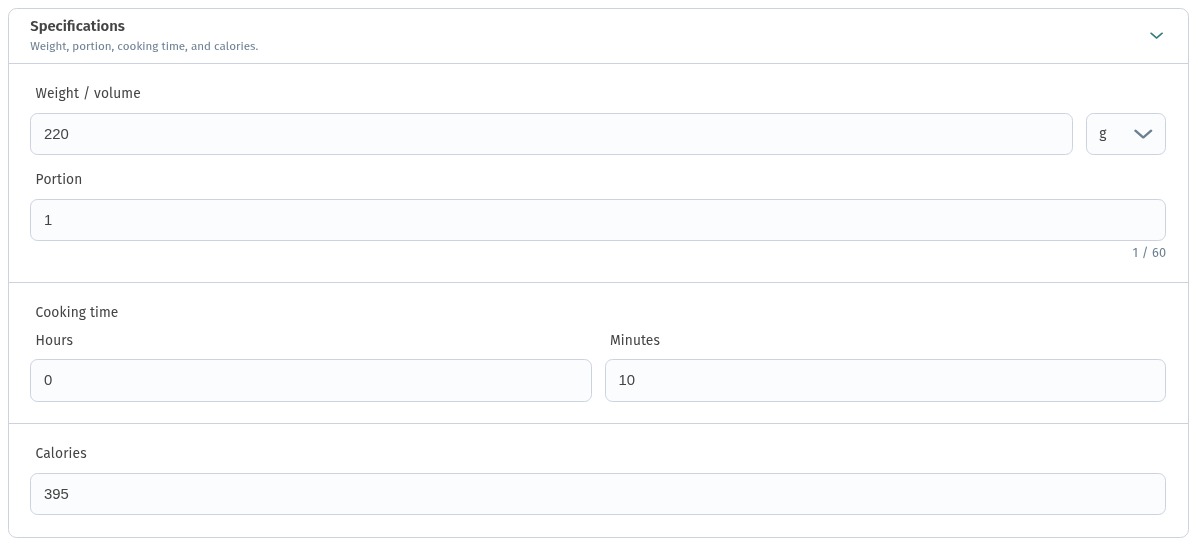
A guest who can't see the plate always wonders about size. Fill in the Specifications block: Weight / volume (with a unit, grams or milliliters), Portion, Cooking time and Calories. On the guest's card each one appears on its own line.
Tips:
- Weight for food, volume for drinks. "220 g" or "400 ml" is clearer than "large portion".
- Pieces go in the description. "5 khinkali", "6 wings": the guest knows at once whether it's enough for the table.
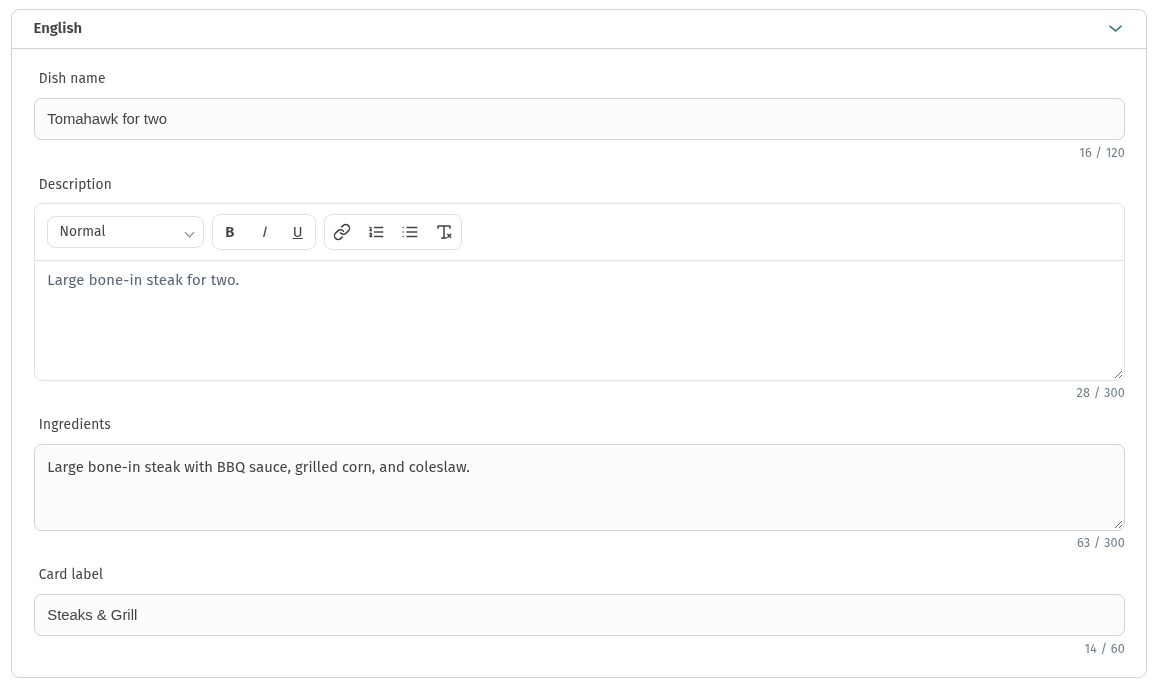
- Format goes in the name. If a dish is for two or for sharing, say so in the name, as in "Tomahawk for two".
- Honest cooking time. 25 minutes is fine if the guest knows in advance.
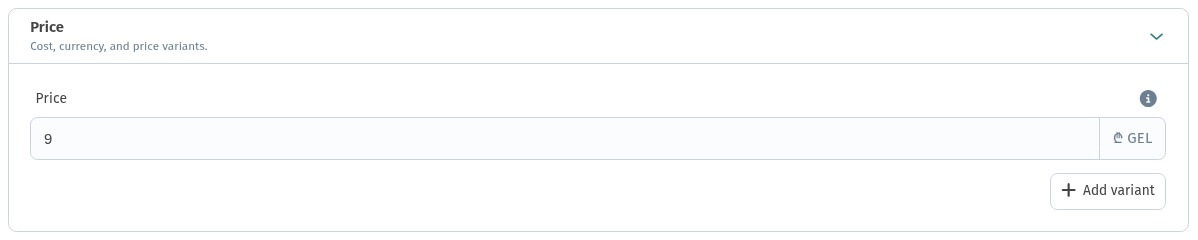
The price is set in the Price block. When a dish comes in sizes (300 g / 500 g, 0.3 / 0.5 l), use Add variant instead of duplicating the item. How to set this up is covered in the dish card article.
5. Ingredients: facts, not feelings
The Ingredients field (up to 300 characters) is for facts. Leave the emotions to the description. List the main ingredients separated by commas, starting with the main one, and always name the sauce. Here is the whole English row of "Tomahawk for two": the name, description and ingredients together.
On the guest's card, the ingredients appear as a separate block next to the weight and allergens:
Rules for ingredients:
- 4–6 ingredients, not the whole recipe card;
- what guests often ask about: spicy, nuts, mushrooms, cilantro;
- allergens go separately, in the Allergens block (details in the dish card article).
6. Words that make guests hungry
Sensory words about taste, texture, temperature and cooking method work better than general praise.
These work: crispy, juicy, slow-cooked, smoked, warm, tender, spicy, homemade, charcoal-grilled, wood-fired, freshly baked.
These don't: tasty, flavorful, exquisite, divine, "signature" without saying what makes it so.
One or two such words per description is enough. The word has to be true: if the sauce is store-bought, don't call it homemade. Guests will notice.
7. Before → after: examples
| Before | After: name | After: description |
|---|---|---|
| Steak | Tomahawk for two | Bone-in steak off the grill with BBQ sauce and corn. Made for sharing. |
| Caesar salad | Chicken Caesar | Crisp romaine, grilled chicken and parmesan with our Caesar dressing. |
| Chicken burger special | Crispy chicken burger | Breaded chicken, fresh lettuce and sauce in a soft bun. |
| Khinkali | Beef & pork khinkali | 5 pieces with a juicy broth inside. Eat by hand, holding the top knot. |
| Soup of the day | Pumpkin cream soup | Silky, with pumpkin seeds and a drop of cream. Served warm. |
| Lemonade | Homemade tarragon lemonade | Fresh tarragon, lime and a little sugar. 400 ml. |
| Chocolate dessert | Warm chocolate fondant | With a molten center and a scoop of vanilla ice cream. Takes 12 minutes. |
Notice that every "after" has the key word at the start of the name, a fact about cooking or taste, and something concrete: pieces, milliliters, minutes.
8. Translations
The fields in Basic information and Description hold the menu's base language. Every other language goes into the Translations block of the same editor: add the language under Languages for translation, expand its row and fill in Dish name, Description and Ingredients. Here is the Georgian row of the same Caesar. The card preview on the right of the editor is a handy way to check the result.
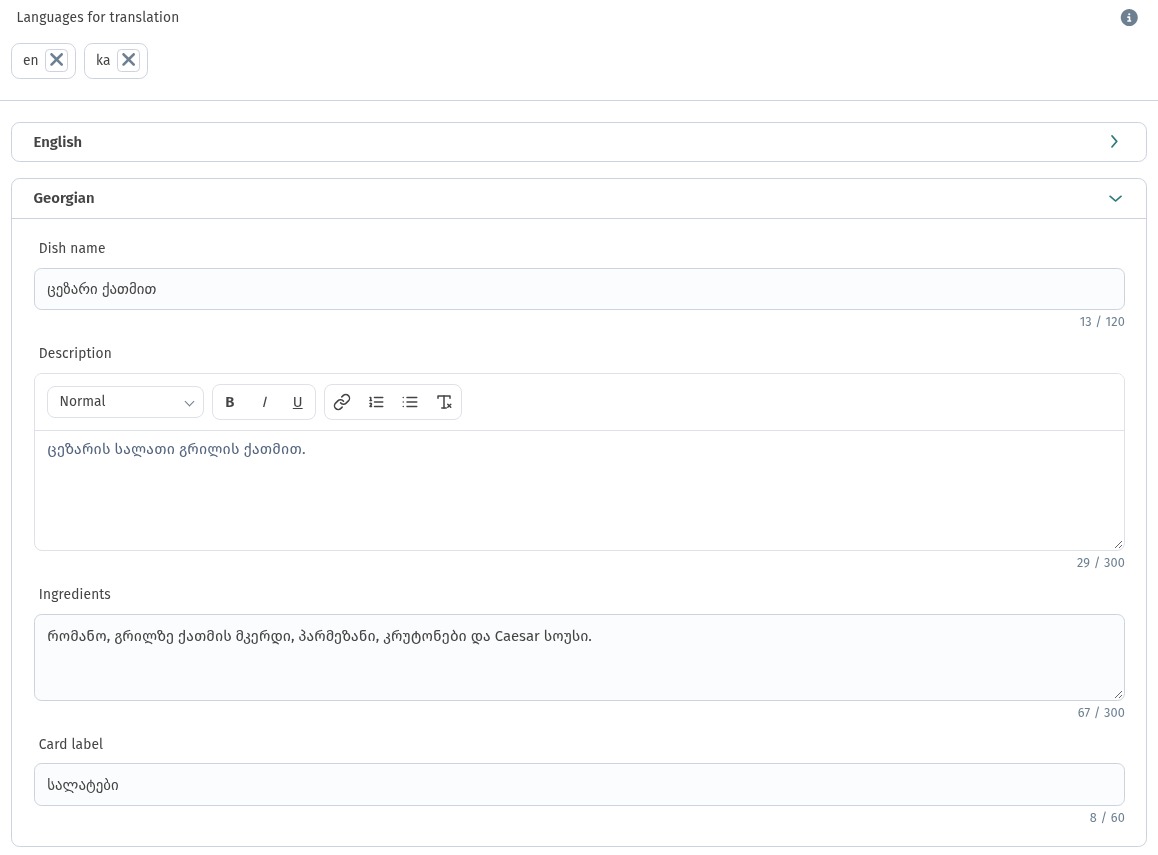
Translate the meaning, not word for word: the natural English for «Цезарь с курицей» is "Chicken Caesar", not "Caesar with chicken". How to run a menu in several languages is covered in A menu in three languages.
Checklist before you save
- The name is 2–4 words, key word first, no caps and no mixed languages.
- The description doesn't repeat the name and fits the main point into the first 35–40 characters.
- Ingredients: 4–6 items separated by commas, sauce named.
- Weight / volume, Portion and Cooking time are filled in.
- The description has one or two sensory words, and they're true.
- Translations are added for every menu language.
- Open the menu on your phone and check the tile and the card through a guest's eyes.