
How a QR menu helps raise the average check: practical tactics
Menu engineering for a QR menu: which dishes to put first, how to use order statistics, HIT and NEW badges, photos, three sizes instead of one price, desserts, sets and the cart. Practical tactics with WebQRMenu screenshots.
The average check is simple arithmetic: revenue divided by the number of orders. To raise it, you don't need to raise prices. You need guests to add one more item, pick the larger size or order a dessert they hadn't planned.
A paper menu can't help much with that. A QR menu can. You decide what the guest sees first, which dishes get a label, how sizes are shown, and you can change any of it in a minute without reprinting. In this article we collect practical menu-engineering tactics and show each one on our demo restaurant Aurora Prime in WebQRMenu.
In short: put the dishes you want to sell in the first two positions of each section; check what guests actually order; use one HIT and one NEW per section; give every dish a photo; offer three sizes instead of one price; keep desserts and drinks close; make sets as ordinary dishes; let the cart do its work.
We won't repeat the basics here. How to set up a dish card with badges, sizes and availability is covered in The dish card in WebQRMenu.
1. The first screen decides more than you think
Most guests don't read the menu from top to bottom. They look at the first screen, tap a category and choose from the first few cards. So the first screen is the most valuable space you have.
In WebQRMenu the guest sees the category chips first and then the first section with its dishes. The order of sections in the menu is the order you set in the dashboard, and you change it in Menu content by dragging a section by its six-dot handle.
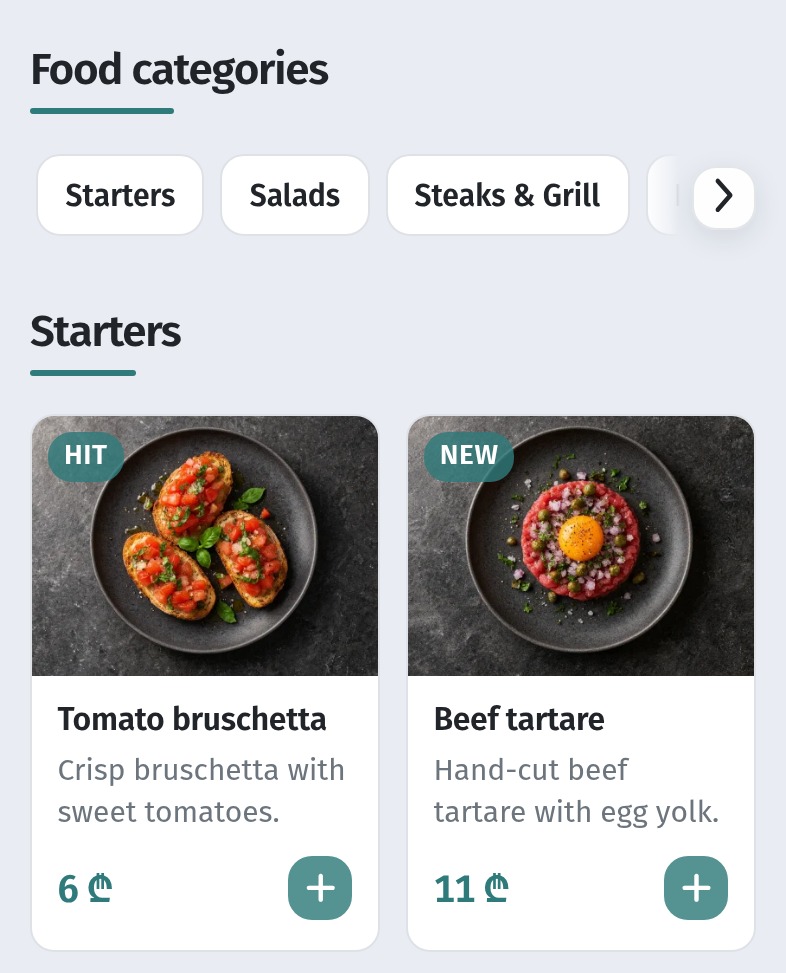
A few rules for the first screen:
- Open with a section that leads to a bigger order. Starters work well: a guest who takes a starter almost always takes a main course too.
- Keep the main courses close. Steaks, grill and pizza should be in the first chips, not hidden behind a scroll.
- Change the order by time of day. In the morning breakfast goes first, in the evening mains and wine. In a QR menu that takes a few seconds.
2. The first two cards in each section
Inside a section the guest sees the dishes as a grid of two columns. The first row is what gets ordered most often, simply because it is seen by everyone. Put there the dishes that bring you the most money: a high-margin signature dish or a dish with expensive sizes.
Here is the Steaks & Grill section at Aurora Prime. The first row is right: the ribeye (17–30 ₾) and the New York steak (15–25 ₾). But the third place, the start of the second row, is taken by a dish that is sold out today.
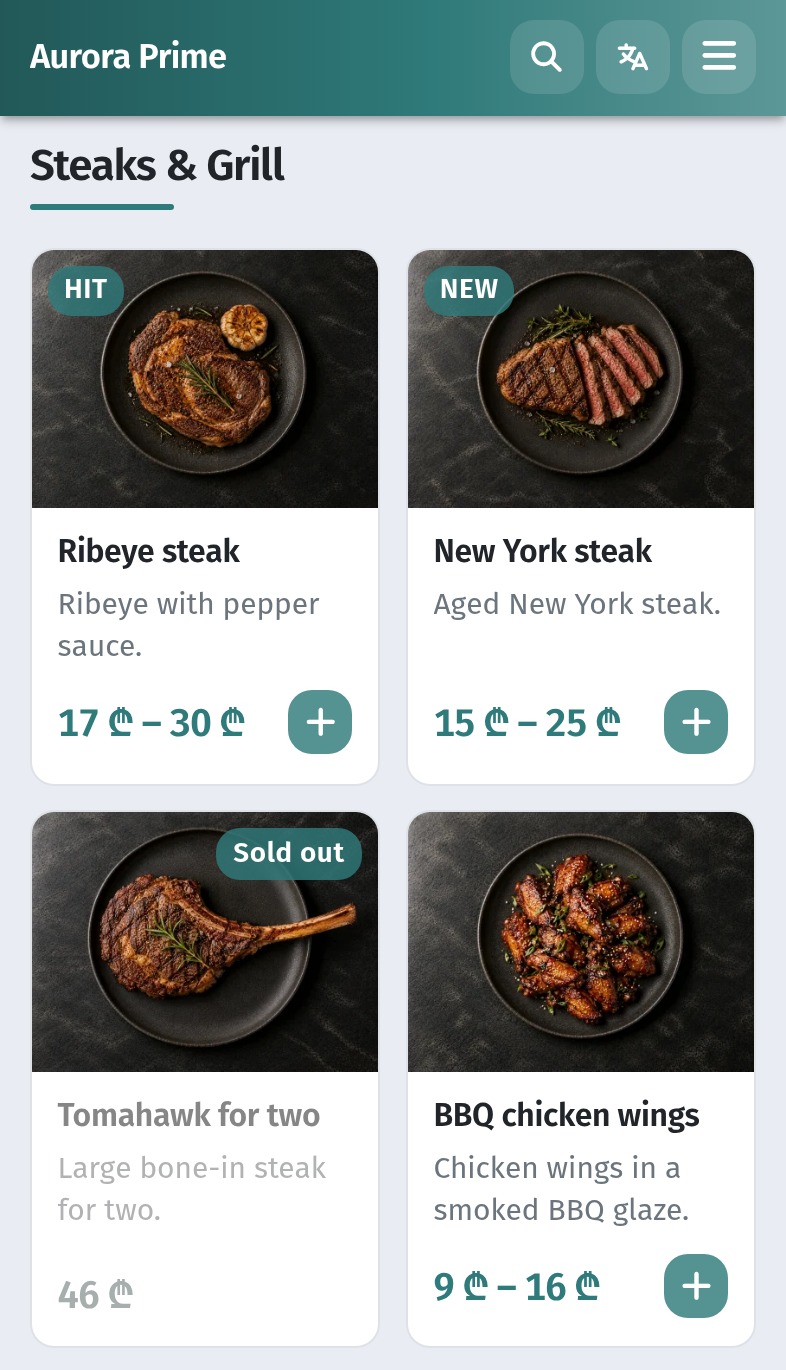
A sold-out dish in a top position wastes the spot. The guest looks at it, can't order it and moves on. Two fixes:
- Move dishes that are often sold out lower in the section, or set them to Hide for the day.
- Fill the freed spot with a dish you want to sell, for example a dish with a higher price or a good margin.
Dishes inside a section are reordered in Menu content the same way as sections: open the section and drag a dish up or down by the six-dot handle to the left of its photo. In this list that would mean, for example, dragging the sold-out Tomahawk for two to the end and lifting a dish with a good margin, such as BBQ pork ribs (14–25 ₾), into the third place.
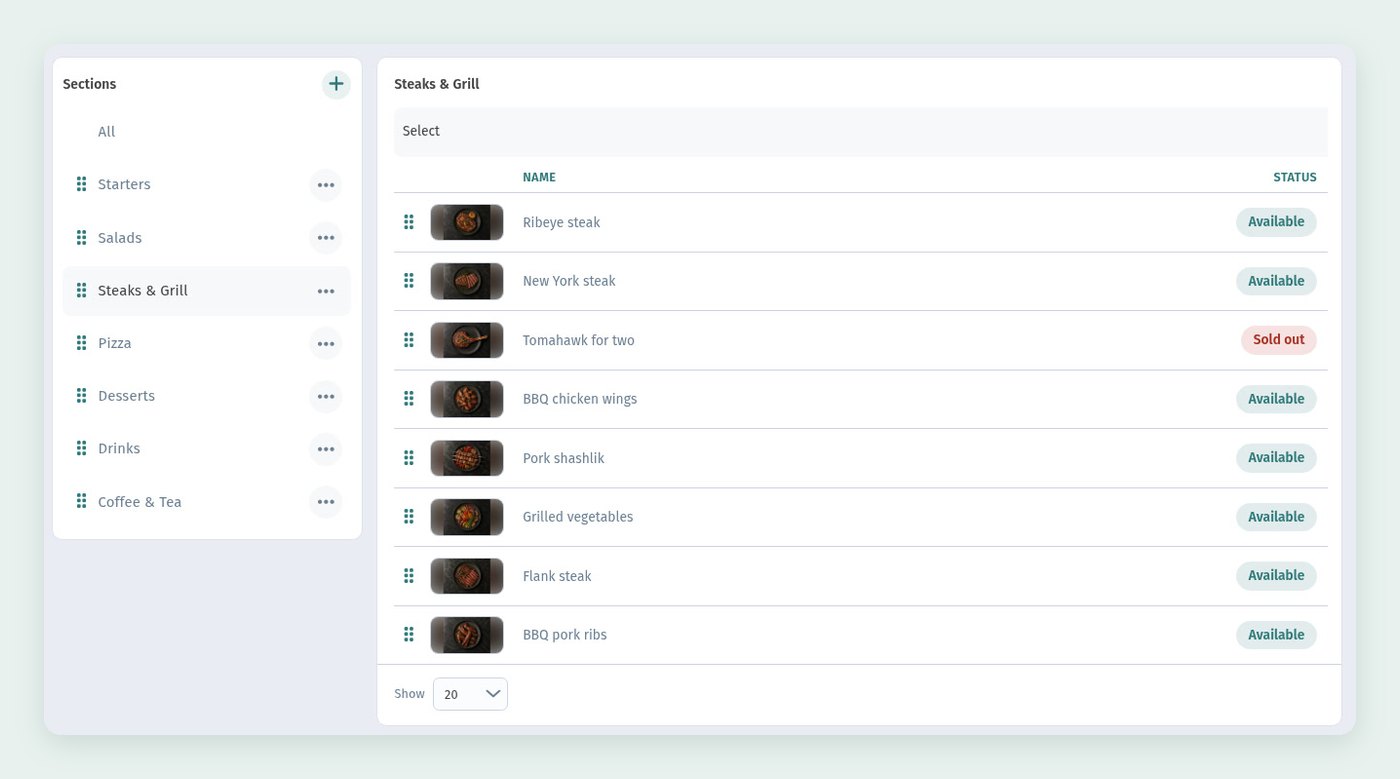
The guest menu shows the dishes in the order of this list, so a new order needs no new QR code and no reprint.
3. Let the numbers choose
Gut feeling is a bad guide to what sells. In Menu content the third filter above the dish list, All orders, sorts dishes by order statistics: Most ordered, Least ordered, Has orders, No orders. Choose the All section and Most ordered to see your bestsellers across the whole menu.
Put the result next to what each dish earns you, and every dish falls into one of four groups. This is the classic menu-engineering matrix:
- Stars: ordered a lot and profitable. Keep them in the first row, give them the HIT badge, don't touch the recipe.
- Workhorses: ordered a lot but earn little. Don't remove them; offer a larger size or a pairing with them, and look at the price.
- Puzzles: profitable but rarely ordered. Move them up to the first row, give them a photo and a better description, try the NEW badge.
- Dogs: rare and unprofitable. Move them to the end of the section or hide them. A shorter menu is easier to choose from.
Repeat the check once a month. The menu changes, and the groups do too.
4. Badges: one HIT and one NEW per section
A badge draws the eye to a card. It only works while it is rare. If half the dishes are labelled, the labels stop meaning anything.
A simple rule that works: one HIT and one NEW per section, both on cards in the first row, both on dishes you want to sell more of. HIT goes to a proven star, NEW to a new dish or a "puzzle" you are pushing. In Aurora Prime most sections are built this way, for example the pizza section: HIT on Margherita, NEW on Pepperoni.
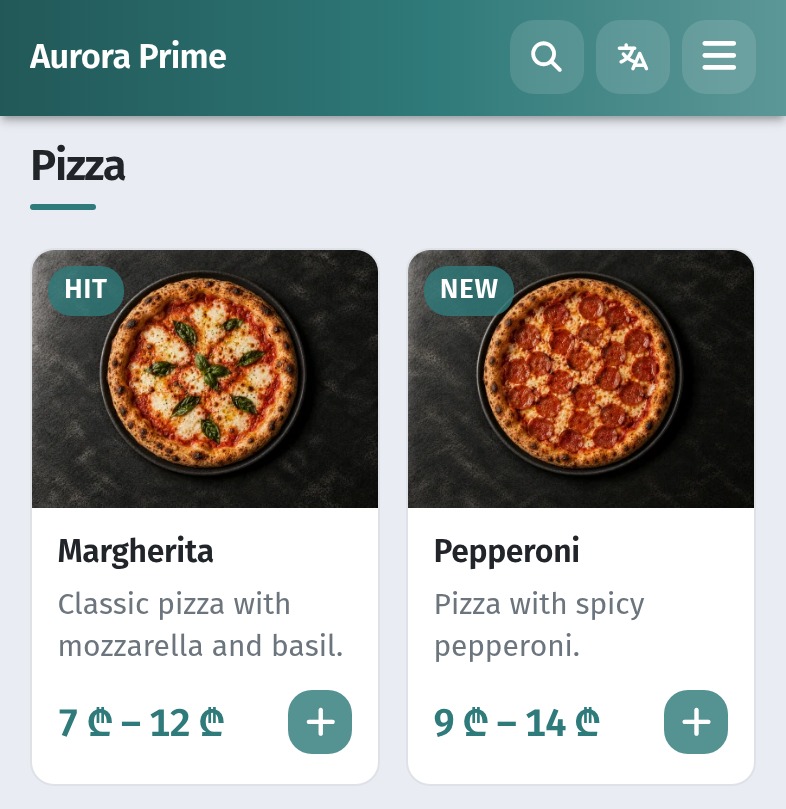
Change badges as the numbers change. If a NEW dish doesn't take off within a few weeks, give the label to another dish.
5. A photo for every dish
On a phone the photo takes up more than half of the card. A card with a good photo next to one without a photo almost always wins. That is why a dish without a photo in a top position loses twice: it is seen by everyone and chosen by few. Under the photo the tile shows the name and the first two lines of the description, so put the most appetising words at the start.
Shoot every dish in the same style: the same background, light and angle, as in the screenshots in this article. Then the menu looks tidy and nothing distracts from the food. How to take and upload photos is described in Dish photos in WebQRMenu.
6. Three sizes instead of one price
When a dish has one price, the guest only decides "yes or no". When it has three sizes, the guest decides "which one", and the question of whether to order is already settled.
Three sizes work better than two. Most guests avoid the extremes and pick the middle option, and a few take the largest. So:
- Make the middle size the one you want to sell most.
- Keep the step to the largest size small. At Aurora Prime the ribeye costs 17 ₾ for 180 g, 22 ₾ for 250 g and 30 ₾ for 350 g: the largest steak has almost twice the meat of the smallest for 13 ₾ more, and that is easy to see.
- Show the price range on the tile. WebQRMenu does this itself: a dish with sizes shows "17 ₾ – 30 ₾" in the list.
In the dish card the guest picks a size, and the Total next to Add to cart updates at once.
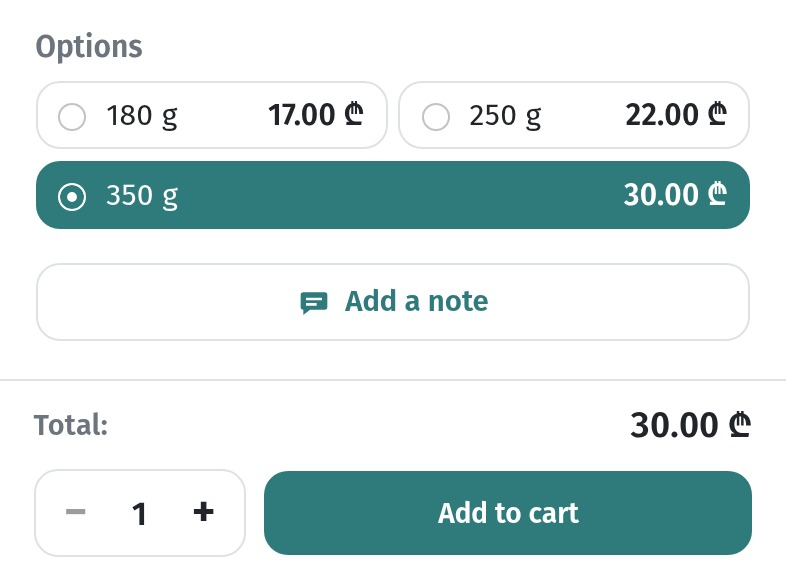
Sizes work for much more than steaks: pizza in 25, 32 and 40 cm, drinks in several volumes, a cheese board for one, two or a company. How to add price variants is in the dish card article.
7. Desserts and drinks: an easy "yes" at the end
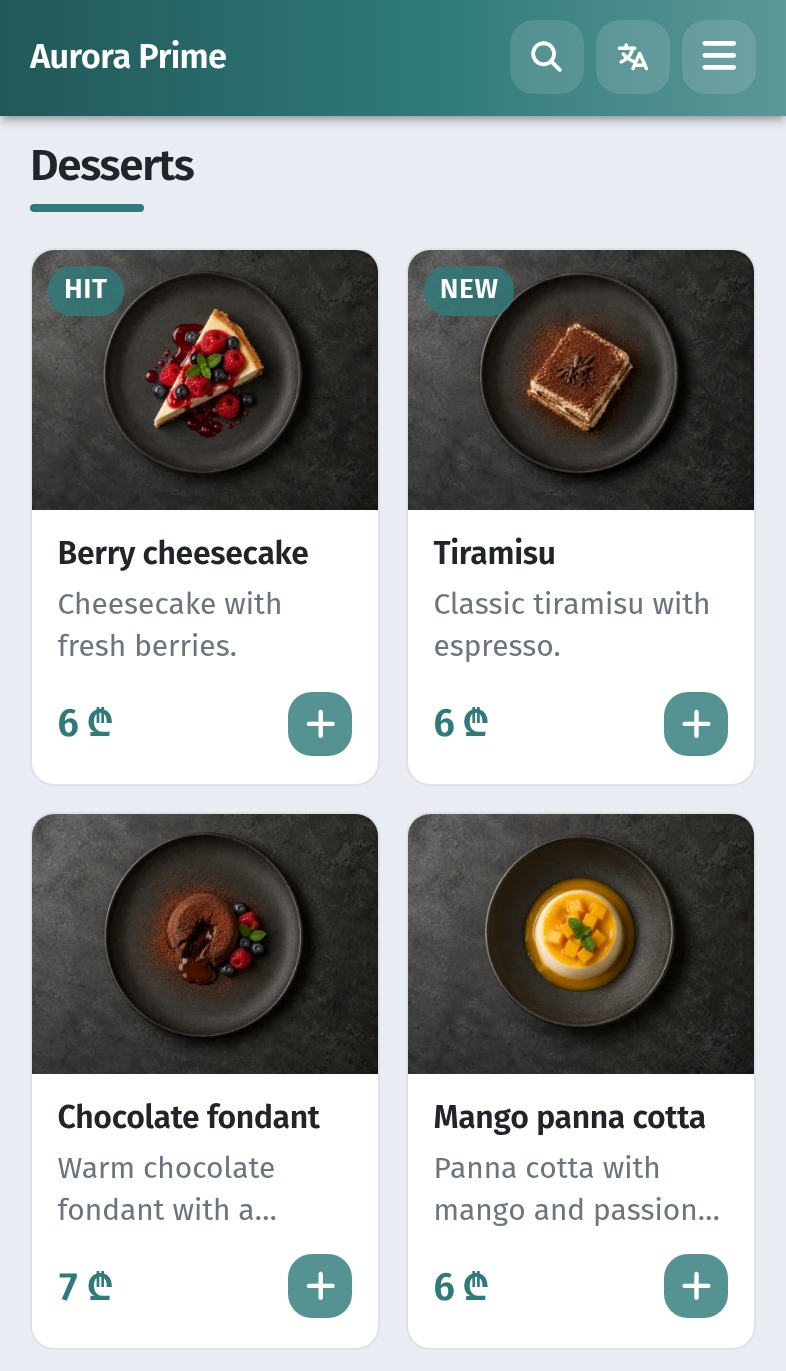
A dessert or a drink costs little next to a main course, so the guest adds it without much thought. That is exactly why these sections are worth attention: one dessert for every second table noticeably raises the average check.
- Keep the dessert section visible. Don't bury it at the very end of a long menu; it can go right after the main courses.
- Put a HIT on a dessert that is easy to share, and photos on all of them.
- Keep prices in one range. In Aurora Prime most desserts cost 6 ₾, so the guest chooses by taste, not by price.
8. Sets as an ordinary dish with its own price
A set can simply be one more dish: its own name, photo and price, for example "Ribeye + grilled vegetables" or "Pizza for two + lemonade". Give it a slightly lower price than the items bought separately and put it in the first row of the section, or create a separate "Sets" section and drag it higher.
A set raises the average check in two ways: the guest takes more items at once, and it is easier to choose a ready set than to put an order together.
9. The cart: the whole order in front of the guest
With a paper menu the guest says the order to the waiter and sees the total only on the bill. In WebQRMenu the order is collected in the cart as the guest browses. The bar at the bottom of the menu shows the number of items and the sum, and the cart shows the whole order: every dish with its size, − and + buttons for the quantity, the Total and the Tips block.
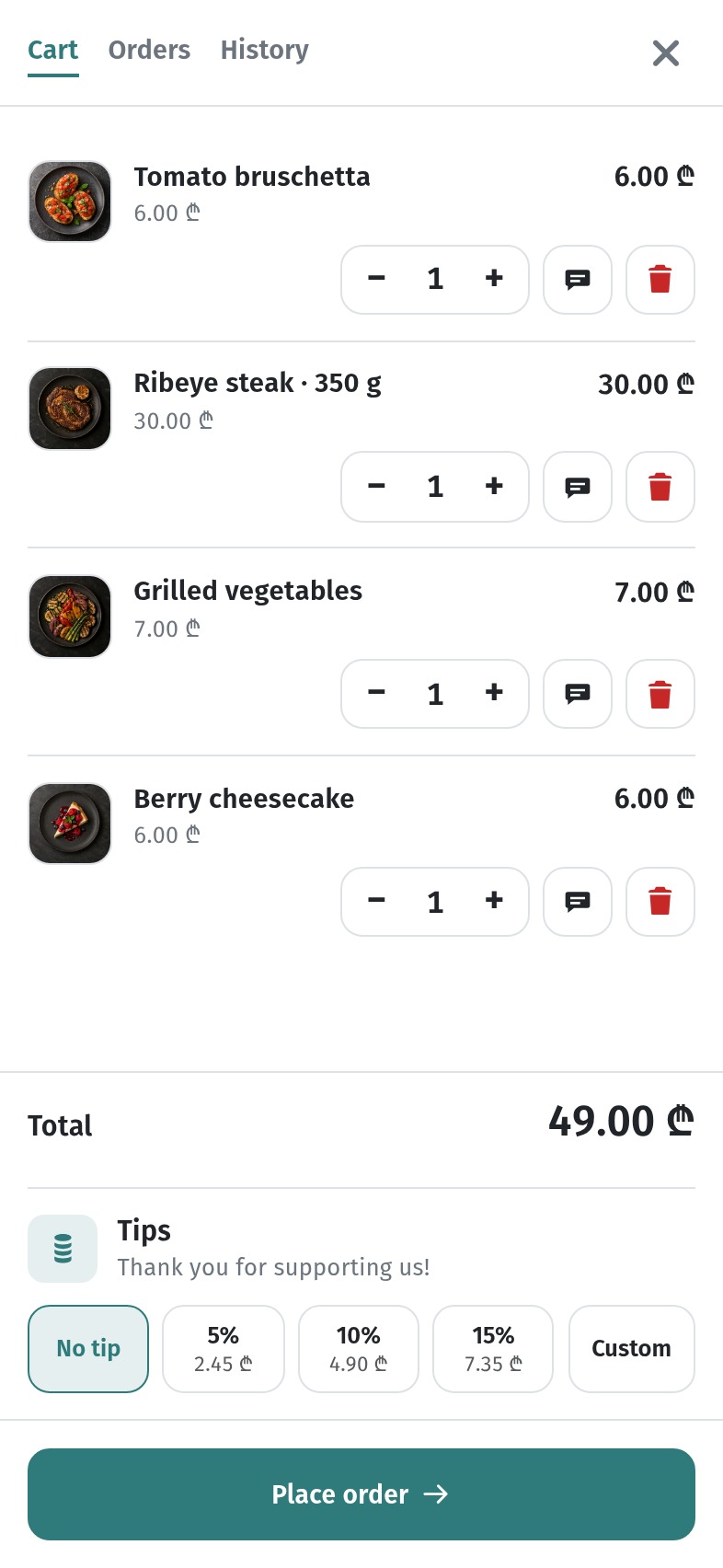
Our test guest added a starter, a 350 g ribeye, grilled vegetables and a cheesecake: 49 ₾ instead of 22 ₾ for one medium steak. What helps here:
- The guest is not in a hurry. There is no waiter waiting at the table, so the guest has time to go back to the menu and add a dessert or a drink.
- The guest sees the order as a whole. It is easy to notice that the steak has no side dish or the table has no drinks.
- Changing the quantity is one tap. "Let's take two" costs the guest one press of +.
How the guest orders step by step, from the cart to the order status, is shown in How a guest orders through the cart in WebQRMenu.
10. How to measure the result
- Write down the starting point: the average check for the last 2–4 weeks.
- Change one thing at a time, for example the order of dishes in one section, and wait 2–3 weeks.
- Compare the average check and the place of the dish under Most ordered before and after.
- Keep what works, roll back what doesn't. In a QR menu either takes a minute.
Checklist
- The first screen opens with a section that leads to a bigger order.
- The first row of every section holds the dishes you want to sell.
- Sold-out and weak dishes are at the end of the section or hidden.
- Once a month you check Most ordered and sort dishes into the four groups.
- One HIT and one NEW per section, on cards in the first row.
- Every dish has a photo in the same style.
- Popular dishes have three sizes, and the middle one is the one you want to sell.
- Desserts and drinks are easy to find and have photos.
- Sets are created as ordinary dishes with their own price.
- You change one thing at a time and compare the average check.